
Guide · October 2026
How to Design a Screen Slide People Actually Notice
A screen slide gets a few seconds of attention from someone across a room. The slides that work are simple, readable, and ask for one thing. Use these rules before you send your artwork.
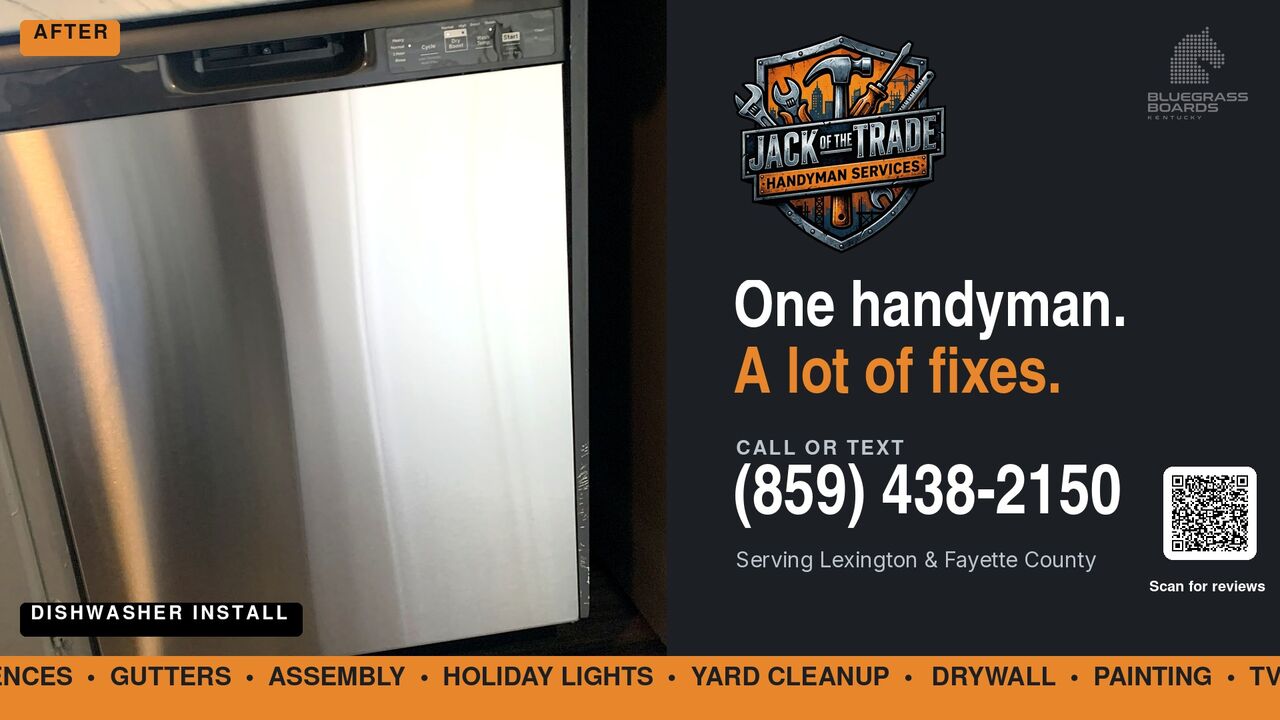
What makes a slide easy to notice?
- One message. A single offer or idea beats a list of everything you do.
- Big type. If it’s hard to read on your phone held at arm’s length, it’s too small for a wall.
- Strong contrast. Light text on a dark background, or the reverse. Avoid busy photos behind words.
- Your name and logo. Make it obvious who the slide is from.
How much text should a slide have?
Keep it to a headline, one short supporting line, and a next step. A good test: can someone read the whole slide in the time it takes to glance up from their coffee? If not, cut words.
Should I put a QR code on my slide?
Yes, when you want an action. Point it to one specific page, like a menu, a booking page, or an offer, rather than your home page. Make the code large, give it a plain border, and add a few words saying what happens: “Scan to book.”
What should the call to action say?
Name one concrete step: visit, book, call, or scan. Add a reason to act now if you have one, like a seasonal special or an upcoming event.
Common slide mistakes to avoid
- Tiny phone numbers and long web addresses
- Five offers on one slide
- Low-resolution logos or photos
- Text placed over a busy photo
Featured businesses get a slide that fits the network style. See what’s included on the For Businesses page.
Lexington local discovery
Want your business on a local screen?
Get a quote for a featured spot, or apply to host a free screen in your venue.
The details
Key takeaways
- Give each slide one message, big type, and strong contrast.
- Keep text to a headline, one supporting line, and a next step.
- Link QR codes to one specific page and label what scanning does.
- Avoid tiny contact details, crowded offers, and busy backgrounds.
Best for: Business owners preparing artwork for an in-venue screen.
Last updated: October 2026